
Fix: Comcast Status Code 225

The Comcast status code 225 error is pretty common among the people who use TV cable in their homes. You won’t be able to see all or a few of your cable channels and you will see the status code 225 error on the screen instead of the cable. The problem is pretty common among Comcast Xfinity cable users.
The status code 225 is shown when there is an interruption in the signal. The signal can be interrupted because of many things. Cable signal might not be able to reach you because of some issues in Comcast backend, it might be because of your house wiring, it can be because of lines outside the house etc.
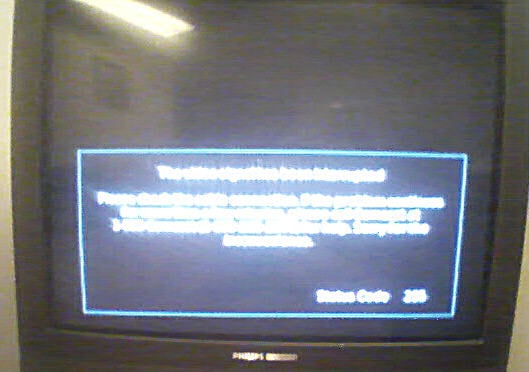
Since there are many reasons for this issue, there are several things that you can do to solve this problem. So start from the method 1 and keep going further until your problem is solved.

Method 1: Contacting Customer Support

The first thing to do is to contact the Comcast customer support. This will help you get an idea whether the problem is from your end or their end. Comcast can send a fresh signal towards you to determine if the signal reaches you or not. They can also check many other things from their end which will help you resolve the issue a lot quickly.

Method 2: Full Reboot of Comcast Box

Sometimes doing a reboot of the whole Comcast box can solve the issue.
  1. Unplug the power cable of Comcast box
  2. Wait 10 seconds
  3. Plug in the Comcast box power cable again
Now check if the issue is still there or not.

Method 3: Check the Cables and Lines

Since the error is caused by an interruption in the signal, faulty cables and outside lines can also be an issue especially if you are living in an extreme environment or it’s been a long time since you replaced the wires.
You can contact the Comcast to get a technician to your house or you can simply get a technician of your own to check the cables and lines. If there is an issue in the lines then you might have to replace that.

Method 4: Try a Different Outlet

On rare occasions, your outlet might be the issue. Try to connect your Comcast box to a different outlet to see if the problem is still there.

Method 5: Comcast Tech

The last resort is to get a Comcast technician to visit your house and perform a full check of everything. They will check your internal wiring, the Comcast box, connections and outside wiring as well.
Sometimes the issue might be in the main box of Comcast that provides the signal to the whole block/area. Ask the Comcast technician to check that as well.

Comments

Popular posts from this blog

How to Fix the ‘Failed to Acquire the VirtualBox COM Object’ Error

Several users are reporting that they are unable to launch VirtualBox. The critical error message that comes up is  “Failed to acquire the VirtualBox COM object. The application will terminate”.  In some cases, the error is also accompanied by a second error message pointing towards the problem. The issue does not seem to be specific to a certain Windows version since it’s confirmed to occur on both Windows 8.1 and Windows 10. Failed to acquire the VirtualBox COM object. The application will now terminate. What is causing the ‘Failed to Acquire the VirtualBox COM Object’ error? We investigated this issue by looking at various user reports and the repair strategies that are commonly deployed successfully in this particular scenario. As it turns out, there are multiple culprits that might end up triggering this issue: VirtualBox is not installed with admin access  – Virtualbox is one of those software products that will require you to install them with a...

How to Format/Indent XML Files in Notepad++

Notepad++ is a free text and source code editor that is mostly used by programmers. It is an advanced alternate version of the default notepad which supports 50 programming, scripting and markup languages. It allows a user to edit codes within multiple tabs in a single window. However, it lacks the formatting for XML files or XML code. Users will find it difficult to edit or read the XML code without the correct format for code. How to Format/Indent XML Files on Notepad++ What is XML File? XML (stands for eXtensible Markup Language) which is a language designed to store and transport data. XML files are just plain text files that can’t do anything on their own. Custom tags are used in XML files to define objects and the data within each object. It defines a set of rules for encoding documents in such a format that both humans and machines could read. XML is similar to HTML but the difference is that HTML defines how data looks, while XML defines what data is. XML Code samp...

How to Fix ‘An Error Has Occurred in the Script On This Page’

Script errors are still a common occurrence among Internet surfers. And it’s not just restricted to web browsers as you might think. The  ‘An error has occurred in the script of this page’  is mostly reported with Internet Explorer, but there are a lot of programs that use IE scripts, so the issue is reported in conjunction with a lot of different application. As it turns out, the issue is not exclusive to a certain Windows version since it’s confirmed to occur on all the most recent versions including Windows 7, Windows 8.1 and Windows 10. An error has occurred in the script on this page. What is causing the  ‘An error has occurred in the script of this page’  issue? We investigated this particular issue by looking at various user reports and the repair strategies that are most commonly used to resolve this problem. Based on our investigations, there are several different culprits that might be responsible for this issue: Java is missing from the Wind...