
Fix: iTunes Error iTunesAdmin.dll failed to register

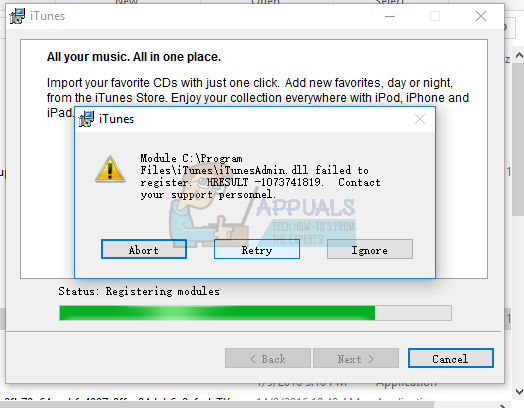
When installing iTunes, you may get the module error relating to iTunesAdmin.dll. This error stops the installation and either asks you to Abort or Retry the operation. This error occurs when the installation gets to “Registering modules” and may occur on any iTunes module and not just only iTunesAdmin.dll.
This is largely due to the absence of Visual C++ Redistributable Packages, which is a requirement for iTunes to be installed. This can be solved by installing Visual C++ Redistributable Packages for Visual Studio 2013 and keeping your PC up to date.

This article will guide you on how to install the Visual C++ Redistributable Package to enable iTunesAdmin.dll and other .dll files to register.
Method 1: Installing Visual C++ Redistributable

The Visual C++ Redistributable Package creates a dependency on the Universal CRT (C Runtime) when applications are built by using the Windows SDK. Installing Microsoft Visual C++ Redistributable will make the iTunesAdmin.dll to register successfully in the system. Installing it is fairly easy.
  1. Download Microsoft Visual C++ Redistributable to your computer. Select your Language and then click Download. Be sure to select the right version for your architecture. x64 for 64 bit and x86 for 32 bit.
  2. Go to the download folder and open vc_redist.x64.exe or vc_redist.x86.exe as an administrator.
  3. Follow the prompts to install the application to your computer.
  4. Reboot your PC and retry installing iTunes.

Method 2: Disabling Your Antivirus

Your antivirus/3rd party firewall may be actively scanning the files during installation and interrupt the installation process. Disabling your antivirus for a few minutes before you begin the installation is a sure way to solve this issue.
  1. Go to the dashboard of your Antivirus. You can get there by double-clicking on the antivirus icon in the notification area.
  2. Look for “Real-Time Protection” or “Active Protection” or options similar to these and then disable them. Avast allows you disable real-time protection for some minutes.
  3. Locate your iTunes, right-click on the iTunes setup and install as an Administrator
  4. Follow the installation process and confirm if this error has ceased this time.

Comments

Popular posts from this blog

How to Fix the ‘Failed to Acquire the VirtualBox COM Object’ Error

Several users are reporting that they are unable to launch VirtualBox. The critical error message that comes up is  “Failed to acquire the VirtualBox COM object. The application will terminate”.  In some cases, the error is also accompanied by a second error message pointing towards the problem. The issue does not seem to be specific to a certain Windows version since it’s confirmed to occur on both Windows 8.1 and Windows 10. Failed to acquire the VirtualBox COM object. The application will now terminate. What is causing the ‘Failed to Acquire the VirtualBox COM Object’ error? We investigated this issue by looking at various user reports and the repair strategies that are commonly deployed successfully in this particular scenario. As it turns out, there are multiple culprits that might end up triggering this issue: VirtualBox is not installed with admin access  – Virtualbox is one of those software products that will require you to install them with a...

Fix: System Found Unauthorized Changes on the Firmware, Operating System or UEFI Drivers

Several users are struggling with the  System found unauthorized changes on the firmware error  at every startup or when trying to take their computer out of hibernation mode. Most affected users report that the issue started occurring after they installed some pending Windows updates. The issue is mostly encountered on Windows 7. The system found unauthorized changes on the firmware, operating system or UEFI drivers. Press [OK] to run the next boot device, or enter directly to BIOS Setup if there are no other boot devices installed. What is causing the System found unauthorized changes on the firmware error We investigated this particular issue by looking at various user reports. This error will occur whenever your system is checking the firmware one some computer hardware parts as part of a new security feature. To be precise, the error is occurring because not all Windows versions will support this new security feature. As it turns out, there are sev...

Fix: The Following Error Occurred Attempting to Join the Domain

Several users are getting the ‘ following error occurred attempting to join the domain ‘ error when trying to connect a computer to a home or work domain. Most of the time, the error is accompanied by an explanation message telling the user that it has exceeded the maximum number of computer accounts. The issue is not restricted to computers that connect to a domain for the first time, as it’s often reported to occur with PCs and laptops previously connected to the same domain. The following error occurred attempting to join the domain. Your computer could not be joined to the domain. What is causing the ‘following error occurred attempting to join the domain’ error? We investigated this particular error by looking at various user reports and the troubleshooting guides that they themselves followed to get the issue resolved. Based on what we were able to gather, there are several different scenarios that might trigger this particular error message: SMB1 support is di...