
Fix: Notepad Access Denied

The error “Access is Denied” occurs when the operating system is unable to save or edit any file using the notepad application. These files are mostly system files which are mostly found in system folders (such as System 32, Program files etc.).
This is basically a user access control function which restricts you from changing system files or creating new ones in system directories. It is done for the safety of your own computer so important system files don’t get changed and you preserve the integrity of the operating system. This has been the case for all versions of Windows.

However, there are instances where you want to deliberately make some changes to some system files and this error can get problematic. We will go through all the steps needed to make sure you get your work done without the annoying error message popping up. This error is also known to pop up when you try to change the “host” files present in the System32 directory.
Note: Malware and virus are known to make changes to the host file. Make sure that you are virus free whenever you are editing the file.

Solution: Using ‘Run as Administrator’

We will open the Notepad application and run it using the ‘Run as administrator command’. This command will enable administrator privileges and open the application in an elevated mode. Do note that you are required to use an administrator account to use this solution.
  1. Press Windows + S, type “notepad” in the dialogue box, right-click on the application and select “Run as administrator”.
  1. A small UAC will pop up asking you to confirm your actions. Press YES to proceed.
  2. Click File > Open.
  1. Now navigate to the location of the file you are trying to access. Make sure “All files” is selected so all type of files are displayed in the window. Select it and click “Open”.
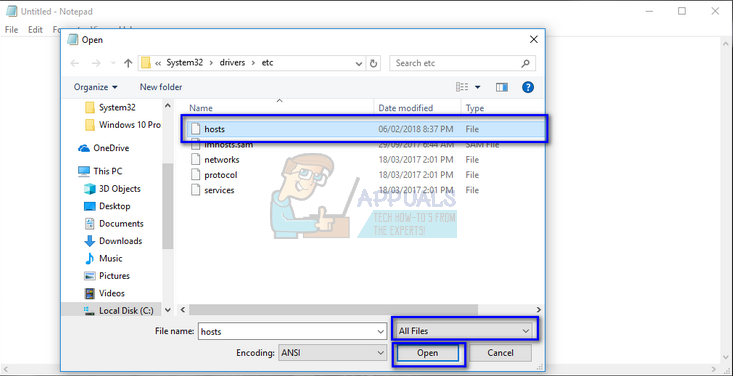
  1. The file will be opened successfully. Make all the necessary changes and click “Ctrl + S” to save the file or save it manually using the options.

Note: If you cannot edit the host files even after performing the above solution, you should check if you have any antivirus enabled on your computer. Third party antivirus software makes sure that you cannot edit any system files even with administrator privileges. Same goes for the firewall. Make sure they are disabled temporarily and try with the solution again.
If you cannot still access the file under discussion, make sure that the ‘Read-only’ option is unchecked in the file’s properties. You can also take ownership of the file, edit it, and change the ownership back. Take a look at following article. Follow the same method on how to take ownership.

Comments

Popular posts from this blog

How to Fix the ‘Failed to Acquire the VirtualBox COM Object’ Error

Several users are reporting that they are unable to launch VirtualBox. The critical error message that comes up is  “Failed to acquire the VirtualBox COM object. The application will terminate”.  In some cases, the error is also accompanied by a second error message pointing towards the problem. The issue does not seem to be specific to a certain Windows version since it’s confirmed to occur on both Windows 8.1 and Windows 10. Failed to acquire the VirtualBox COM object. The application will now terminate. What is causing the ‘Failed to Acquire the VirtualBox COM Object’ error? We investigated this issue by looking at various user reports and the repair strategies that are commonly deployed successfully in this particular scenario. As it turns out, there are multiple culprits that might end up triggering this issue: VirtualBox is not installed with admin access  – Virtualbox is one of those software products that will require you to install them with a...

How to Format/Indent XML Files in Notepad++

Notepad++ is a free text and source code editor that is mostly used by programmers. It is an advanced alternate version of the default notepad which supports 50 programming, scripting and markup languages. It allows a user to edit codes within multiple tabs in a single window. However, it lacks the formatting for XML files or XML code. Users will find it difficult to edit or read the XML code without the correct format for code. How to Format/Indent XML Files on Notepad++ What is XML File? XML (stands for eXtensible Markup Language) which is a language designed to store and transport data. XML files are just plain text files that can’t do anything on their own. Custom tags are used in XML files to define objects and the data within each object. It defines a set of rules for encoding documents in such a format that both humans and machines could read. XML is similar to HTML but the difference is that HTML defines how data looks, while XML defines what data is. XML Code samp...

Fix: System Found Unauthorized Changes on the Firmware, Operating System or UEFI Drivers

Several users are struggling with the  System found unauthorized changes on the firmware error  at every startup or when trying to take their computer out of hibernation mode. Most affected users report that the issue started occurring after they installed some pending Windows updates. The issue is mostly encountered on Windows 7. The system found unauthorized changes on the firmware, operating system or UEFI drivers. Press [OK] to run the next boot device, or enter directly to BIOS Setup if there are no other boot devices installed. What is causing the System found unauthorized changes on the firmware error We investigated this particular issue by looking at various user reports. This error will occur whenever your system is checking the firmware one some computer hardware parts as part of a new security feature. To be precise, the error is occurring because not all Windows versions will support this new security feature. As it turns out, there are sev...