
Fix: Surface Pro 3 Stuck on Surface Screen

Surface Pro is one of the most popular Tablets series by Microsoft. Although, Microsoft doesn’t produce laptops and tablets but this series has done a good job when it comes to the number of units sold. The design, specifications and everything related is amazing and people are loving it.
Despite its tremendous design and performance, there are some glitches reported by the users. One of the most notorious issues with surface pro 3 is Frozen Display.

This is pretty annoying and a lot of users have lost their data while working on their Surface Pro 3.
surface pro 3 freezes

Reasons Behind Surface Pro 3 Frozen Display:

Currently, there are no specific reasons causing this issue. According to a majority of user’s reviews, display of Surface Pro 3 freezes randomly. Sometimes, it happens while switching between apps, while on the other hand, it is also reported that display freezes when their Surface pro 3 is at rest. So, in order to know the reason for its display to freeze, you should give a try to know what you were doing when it froze.

Solution to Fix this Problem:

There is no specific solution to solve this freezing issue with Surface Pro 3. You can try the following methods below and check if these work for you.

Method # 1: Using the Volume Key

If the display freezes at sometime, you may need to give a try to force shutdown. For the sake of shutting it down forcefully, follow the steps below.
1. Turn-off your Surface Pro 3.
2. Now, you will need to hold Volume Up + Power buttons for a span of 15 seconds.
3. After holding the buttons for 15 seconds, release the buttons and wait up to 10 seconds.
4. Restart the Surface Pro 3 after waiting for 10 seconds and hopefully, it would be a happy moment for you.
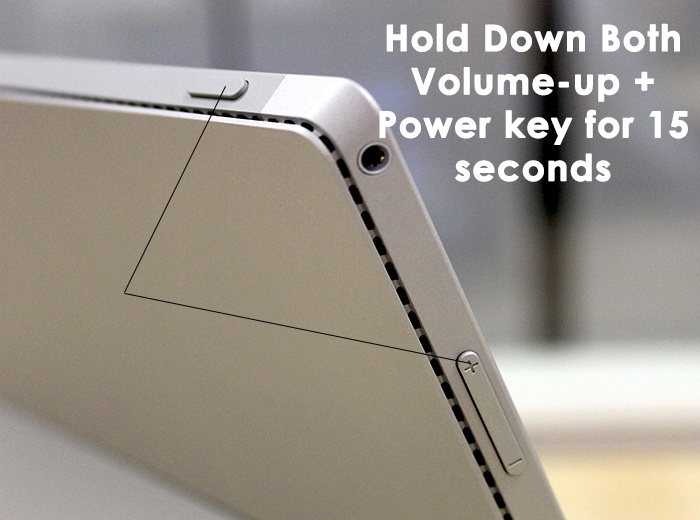
 surface pro 3 freezes1

Method # 2: General Solution

If above method doesn’t solve your issue, you can use this method to find the way of fixing it.
1. Make sure that the firmware on your Surface Pro 3 is up to date. You can check it inside Settings > Update and Security.
2. Also update your drivers to the latest ones and make sure that they are no corrupted devices attached to the Surface.
3.If anything doesn’t seem to solve this issue, you can restore or install a clean copy of Windows on your Surface Pro 3.


Comments

Popular posts from this blog

How to Fix the ‘Failed to Acquire the VirtualBox COM Object’ Error

Several users are reporting that they are unable to launch VirtualBox. The critical error message that comes up is  “Failed to acquire the VirtualBox COM object. The application will terminate”.  In some cases, the error is also accompanied by a second error message pointing towards the problem. The issue does not seem to be specific to a certain Windows version since it’s confirmed to occur on both Windows 8.1 and Windows 10. Failed to acquire the VirtualBox COM object. The application will now terminate. What is causing the ‘Failed to Acquire the VirtualBox COM Object’ error? We investigated this issue by looking at various user reports and the repair strategies that are commonly deployed successfully in this particular scenario. As it turns out, there are multiple culprits that might end up triggering this issue: VirtualBox is not installed with admin access  – Virtualbox is one of those software products that will require you to install them with a...

How to Format/Indent XML Files in Notepad++

Notepad++ is a free text and source code editor that is mostly used by programmers. It is an advanced alternate version of the default notepad which supports 50 programming, scripting and markup languages. It allows a user to edit codes within multiple tabs in a single window. However, it lacks the formatting for XML files or XML code. Users will find it difficult to edit or read the XML code without the correct format for code. How to Format/Indent XML Files on Notepad++ What is XML File? XML (stands for eXtensible Markup Language) which is a language designed to store and transport data. XML files are just plain text files that can’t do anything on their own. Custom tags are used in XML files to define objects and the data within each object. It defines a set of rules for encoding documents in such a format that both humans and machines could read. XML is similar to HTML but the difference is that HTML defines how data looks, while XML defines what data is. XML Code samp...

Fix: System Found Unauthorized Changes on the Firmware, Operating System or UEFI Drivers

Several users are struggling with the  System found unauthorized changes on the firmware error  at every startup or when trying to take their computer out of hibernation mode. Most affected users report that the issue started occurring after they installed some pending Windows updates. The issue is mostly encountered on Windows 7. The system found unauthorized changes on the firmware, operating system or UEFI drivers. Press [OK] to run the next boot device, or enter directly to BIOS Setup if there are no other boot devices installed. What is causing the System found unauthorized changes on the firmware error We investigated this particular issue by looking at various user reports. This error will occur whenever your system is checking the firmware one some computer hardware parts as part of a new security feature. To be precise, the error is occurring because not all Windows versions will support this new security feature. As it turns out, there are sev...